

NGFW, Cisco, Fortinet, SD-WAN, VPN, SASE
When purchasing a Firewall, you should consider:
1.
Size of the network
2.
Speed of the Internet
3.
Number of potential VPNs
4.
General traffic flow
5.
Line of business applications
Firewall Types
Traditional OSI L4 (filter traffic by port number)
NGFW OSI L7 (filter traffic by application)
Next Gen Firewall (IDS/IPS, URL and spam filter, content and malware inspection)
L3 Edge/Border Router (NAT, routing protocols)
Site-to-Site and Mobile VPN
Captive Portal
DNS/DHCP Server
Load Balancing, Traffic Shaping
HA Dual WAN
1.
Palo Alto - Palo Alto Networks is known for its robust and advanced cybersecurity solutions, particularly in the next-generation firewall (NGFW) category.
2.
Cisco Meraki - Meraki is known for its cloud-managed networking and security appliances. It's a subsidiary of Cisco, offering cloud-based solutions for network security.
3.
Fortinet - Fortinet is recognized for its strong network security solutions, including firewalls, and has a significant market presence.
4.
Sophos - Sophos offers a range of security products, including firewall solutions, and has a significant customer base.
5.
SonicWall - SonicWall is known for its firewall and network security products, although it may be considered somewhat smaller compared to the companies listed above.
6.
Netgate - Netgate is the company behind pfSense, an open-source firewall and router platform. While it's highly regarded for certain use cases, it may not be as widely recognized as the larger vendors in this list.
7.
Ubiquiti - Ubiquiti UniFi is primarily known for its wireless and networking equipment. While they may offer basic security features, they are not as prominent in the firewall and security market as others on this list.
VLAN Office Scheme
10.0.1.1/24 - Core (Devices)
10.0.2.1/24 - Staff
10.0.3.1/24 - VoIP
10.0.4.1/24 - CCTV
10.0.5.1/24 - IoT
10.0.6.1/24 - Guest
Small Office (1-10 employees)
Medium Office (11-50 employees)
Big Office (51-200 employees)
Large Corporation (201-1000 employees)
Virtual Private Network VPN
SSL/TLS for user access
Cisco AnyConnect
Fortinet FortiClient
UI WiFiman (Teleport VPN)
OpenVPN
IPSec tunnels site-to-site access (SD-WAN)
pfSense site-to-site
SD-WAN uses IPsec under the hood:
Palo Alto Networks PA-Series
Cisco Meraki MX Series
Fortinet FortiGate F,G series + FortiManager
Ubiquiti UniFi Site Magic
Modern VPN (WireGuard)
WireGuard Tunnel (pfSense)
description
listen port 51820
interface keys (private, public)
preshared key
Interface
OPT1 (change name)
Static IPv4
10.0.1.1/24
Firewall Rule (WGVPN)
Action: Pass
Protocol: Any
Description: WireGuard Allow
Firewall Rule (WAN)
Action: Pass
Protocol: UDP
Destination Port Range: From 51820 to 51820
Description: WireGuard Allow
Peers
Tunnel: tun_wg0(WireGuard)
Description: WindowsPC (peer hostname)
Public Key: ... (peer pk)
Pre-shared Key: ... (extra security)
Allowed IP: 10.0.1.10/32 (peer assigned IP)
## WireGuard Clients (Peers)
New Tunnel: pfSense5720
Public key: ... (autogenerated)
[Interface]
PrivateKey = ... (autogenerated)
Address = 10.0.1.10/24
DNS = 1.1.1.1, 8.8.8.8
[Peer]
PublicKey = ... (pfSense tunnel)
PreSharedKey = ... (pfSense peer)
AllowedIPs = 10.0.1.0/24, 10.0.0.0/24 (Split Tunnel)
AllowedIPs = 0.0.0.0/0 (Full Tunnel)
Endpoint = Public_IP:51820 or DDNSHostname:51820
Enterprise Mesh/Overlay VPN (Tailscale)
Encryption
Open Source
Self Hosting
Client Support
Tailscale
WireGuard
Client only
3rd party (Headscale)
Windows, macOS, Linux, iOS, Android, Synology, pfsense
Netbird
WireGuard
Client, Server
Yes (apparently)
Windows, macOS, Linux, iOS
Netmaker
WireGuard
Everything
Kubernetes based
Windows, macOS, Linux
$ curl -fsSL https://tailscale.com/install.sh | sh # Install Tailscale
$ sudo tailscale up # Run and Login to Tailscale
$ tailscale --version
$ tailscale status
$ sudo tailscale up
$ sudo tailscale down
$ sudo tailscale login
$ sudo tailscale logout
$ sudo systemctl restart tailscaled
Zero Trust Network Access ZTNA
Encryption
Open Source
Self Hosting
Client Support
Zerotier
Custom Protocol
Client only
Yes (no web UI)
Windows, macOS, Linux, iOS, Android, Synology
Twingate
Unspecified
no
no
Windows, macOS, Linux, iOS, Android, ChromeOS
Cloudflare Tunnels
Secure Access Service Edge SASE
(Centralized cloud management)
Software-Defined Wide Area Network SD-WAN
Secure Web Gateway SWG
Zero-Trust Network Access ZTNA
Cloud Access Security Broker CASB
Firewall as a Service FWaaS
Security Service Edge SSE: (CASB: SWG + ZTNA) (without SD-WAN)
Single sign-on SSO (unified ID provider)


Cisco Meraki

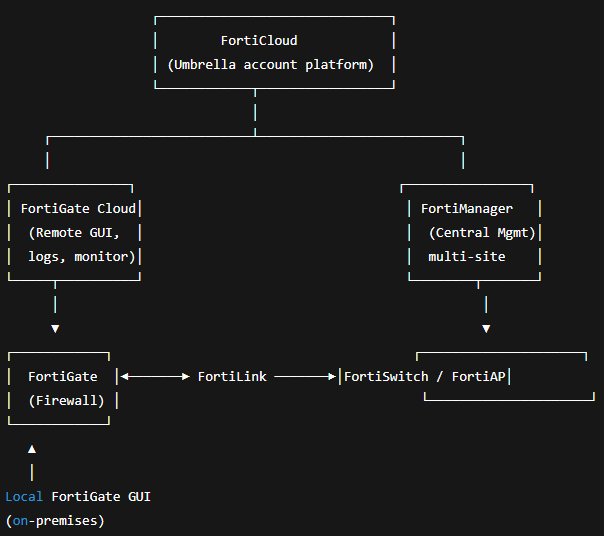
Fortinet FortiGate
# (Local device)
https://<FortiGate_IP> (default: https://192.168.1.99)
Designate FortiLink ports on FortiGate to manage FortiSwitch and FortiAP. A single management/control link between the FortiGate and FortiSwitch/FortiAP, merging everything into one system.
Includes:
FortiGate Cloud - FortiGate GUI in the cloud + cloud-based log storage and visibility
FortiAnalyzer Cloud
FortiManager Cloud - Central management, multi-site
Enterprise-grade centralized management system - Manage multiple FortiGates, FortiSwitches, and FortiAPs across multiple sites.
On-prem or as a cloud service (FortiManager Cloud)
Netgate pfSense
Ubiquiti UniFi
Syslog and SNMP (Monitoring)
Syslog (System Logging Protocol): Se centra en la mensajería de eventos y el registro histórico. Es ideal para la solución de problemas, auditorías e investigaciones de seguridad (SIEM)
SNMP (Simple Network Management Protocol): Se centra en la monitorización del rendimiento, la salud y la gestión de los dispositivos de red. Se utiliza para recopilar métricas en tiempo real (uso de CPU, ancho de banda, memoria)
Ejemplo Práctico: Imagina que el disco duro de un servidor se llena:
1.
2.
La Trap SNMP te dice "hay un problema de almacenamiento AHORA" , mientras que los Logs Syslog te dicen "esto es exactamente por qué está ocurriendo el problema"
Soluciones:
Syslog + SNMP: SolarWinds, ManageEngine OpManager, Paessler PRTG y Checkmk
Wazuh (XDR/SIEM): Análisis de Logs (Syslog), Seguridad, Detección de intrusiones, Cumplimiento. Recopilar todos los logs para auditoría y seguridad (¿quién hizo qué y cuándo?)
Zabbix (NMS): Métricas de Rendimiento (SNMP), Disponibilidad, Gráficas, Monitoreo de Infraestructura. Recopilar métricas para el rendimiento y la capacidad (¿qué tan cargado está el dispositivo?)
Old WAN
T1 - 1.54Mbps
T3 - 43.736Mbps
E1 - 2.048Mbps
E3 - 34.368Mbps