OSI Model, Cisco CCNA, LAN Architectures
Open Systems Interconnection Model (OSI)
Created by the International Organization for Standardization (ISO)
OSI Model
Name
Protocol Data Units (PDUs)
Device
Protocols
Function
Layer 7
Layer 6
Layer 5
Layer 4
Layer 3
Layer 2
Layer 1
text
TCP/IP Suite
The model used in real modern networks, instead of the OSI Model
TCP/IP Suite
Name
Layer 5
Layer 4
Layer 3
Layer 2
Layer 1
MAC Address
Media Access Control Address
6-byte (48-bit) physical address assigned to the device when it is made
Burn-In Address (BIA)

IP Address
IPv4 Address Format (Dotted Decimal Notation)

(4,294,967,296) of them (2^32)
First Octet
Range
Purpose
Private
Reservation (Mask/CIDR)
Addresses p Network
Class A
Class B
Class C
Class D
Class E
x.x.x.0 Network address
x.x.x.1 Default Gateway (Router address usually)
x.x.x.255 Broadcast address
Subnetting
128 64 32 16 8 4 2 1 Group Size
128 192 224 240 248 252 254 255 Subnet Mask
/1 /2 /3 /4 /5 /6 /7 /8 CIDR Notation
/9 /10 /11 /12 /13 /14 /15 /16 CIDR Notation
/17 /18 /19 /20 /21 /22 /23 /24 CIDR Notation
/25 /26 /27 /28 /29 /30 /31 /32 CIDR Notation
ex. 10.1.1.37/29 (.0, .8, .16, .24, .32, .40…)
Network ID 10.1.1.32
First Host IP 10.1.1.33
Last Host IP 10.1.1.38
Broadcast IP 10.1.1.39
Next Network 10.1.1.40
Number of IP Addresses 8 (6 usable)
CIDR/Subnet 255.255.255.248
Fixed-Length Subnet Mask (FLSM)

Variable-Length Subnet Mask (VLSM)

Supernetting - IP Aggregation

L1 Physical Mediums
Ethernet Standards (copper)
Common Name
IEEE Standard
Informal Name
Max Length
Num of Pairs Used
10 Mbps
100 Mbps
1 Gbps
10 Gbps
Defined in the IEEE 802.3 Standard in 1983
IEEE = Institute of Electrical and Electronic Engineers
BASE = refers to baseband signaling
T = twisted pair
Fiber-Optic Cable Standards
SFP Transceiver (Small Form-Factor Pluggable)
Cable Type
IEEE Standard
Informal Name
Max Length
1 Gbps
10 Gbps
10 Gbps
10 Gbps
L2 Data Link Protocols (Switching)
Dinamic Trunking Protocol (DTP)
Cisco proprietary protocol that allow Cisco switches to dynamically determine their status (access or trunk) without manual configuration. It is enabled by default on all Cisco switch interfaces.
## Manually configuration
switchport mode access
switchport mode trunk
VLAN Trunking Protocol (VTP)
It allows to configure VLANs on a central VTP server switch, and other switches (VTP clients) will synchronize their VLAN database to the server.
It is designed for large networks with many VLANs, so that you don’t have to configure each VLAN on every switch.
Spanning Tree Protocol (STP)
(Industry standard IEEE 802.1D protocol)
L2 protocol is predominantly used to prevent loops and broadcast storms in network redundancy

Loops and broadcast storms and MAC address Flapping:

Switches form ALL vendors run STP by default
STP works by designating a single "root bridge" within the network, and then blocking redundant paths.
By selecting which ports are forwarding and which port are blocking, STP creates a single path to/from each point in the network.
STP-enabled switches send/receive Hello Bridge Protocol Data Units (BPDUs) out of all interfaces every 2 seconds
If a switch receives a Hello BPDU on an interface, it knows that interface is connected to another switch

STP / 801.D Original STP
PVST+ Cisco improvement of STP adding per VLAN feature
RSTP / 802.1w Improved STP with much faster convergence
Rapid PVST+ Cisco improvement of RSTP adding per VLAN feature
Speed
STP Cost
RSTP Cost
10 Mbps
100
2,000,000
100 Mbps
19
200,000
1 Gbps
4
20,000
10 Gbps
2
2,000
100 Gbps
x
200
1 Tbps
x
20
Send/Receive BPDUs
Frame forwarding
MAC address learning
Stable/Transitional
Blocking
NO/YES
NO
NO
Stable
Listening
YES/YES
NO
NO
Transitional
Learning
YES/YES
NO
YES
Transitional
Forwarding
YES/YES
YES
YES
Stable
Disabled
NO/NO
NO
NO
Stable
Send/Receive BPDUs
Frame forwarding
MAC address learning
Stable/Transitional
Discarding
NO/YES
NO
NO
Stable
Learning
YES/YES
NO
YES
Transitional
Forwarding
YES/YES
YES
YES
Stable
EtherChannel
a.k.a. Port Channel or Link Aggregation Group
EtherChannel groups multiple physical interfaces together to act as a single logical interface to reduce congestion.
Access Switch 1 → Distribution Switch 1:

STP will treat this group as a single interface
PAgP (Port Aggregation Protocol) - Cisco proprietary protocol {Desirable/Auto}
LACP (Link Aggregation Control Protocol) - Industry standard protocol IEEE 802.3ad {Active/Passive}
Dynamically negotiates the creation/maintenance of the EtherChannel (Like DTP does for trunks)
Static EtherChannel (No protocol) - Interfaces are statically configured to form an EtherChannel (Not recommended)
Layer 2 Discovery Protocols
Cisco proprietary protocol
Industry standard protocol (IEEE 802.1AB)
L3 Network Layer (Routing)
Static Routing
R1# show ip route
L - local # A route to the actual IP address configured on the interface, with a /32 netmask (the address of the interface)
C - connected # A route to the network the interface is connected to, with the actual netmask (the network connected to the interface)
S - static

Dynamic Routing
Routing Protocols

Dynamic Routing Protocol Metrics
Interior Gateway Protocol
Metric
Explanation
RIP
Hop Count
Each router in the path counts as one ‘hop’. The total metric is the total number of hops to the destination. Links of all speeds are equal.
EIGRP
Bandwidth & delay
Complex formula that can take into account many values. By default, the bandwidth of the slowest link in the route and the total delay of all links in the route are used.
OSPF
Cost
The cost of each link is calculated based on bandwidth. The total metric is the total cost of each link in the route.
IS-IS
Cost
The total metric is the total cost of each link in the route. The cost of each link is not automatically calculated by default. All links have a cost of 10 by default.
Administrative Distance
Route Source (Protocol)
Default AD
Connected interface
0
Static route to a next hop
1
EIGRP summary route
5
External BGP
20
Internal EIGRP
90
IGRP
100
OSPF
110
IS-IS
115
RIP
120
EGP
140
External EIGRP
170
Internal BGP
200
Unknown
255

Route Precedence
Routers compare three items to determine the best path:
1.
Route Specificity (more specific is better)
2.
Administrative Distance (lower is better)
3.
Metric (lower is better)
If all three items are identical, Routers will load balance across multiple paths (Equal Cost Multi-Path ECMP)
Link State Routing Protocols
When using a link state routing protocol, every router creates a “connectivity map” of the network.
Each router advertises information about its interfaces (connected networks) to its neighbours.
Link state protocols tend to be faster in reacting to changes in the network than distance vector protocols.
Open Shortest Path First (OSPF)
(aka Dijkstra’s algorithm)
L3 protocol, is one of a family of IP Routing protocols , and is an Interior Gateway Protocol (IGP) for the Internet, used to distribute IP routing information throughout a single Autonomous System (AS) in an IP network
Three versions:
OSPFv1 (1989) - Old, not in use anymore
OSPFv2 (1998) - Used for IPv4
OSPFv3 (2008) - Used for IPv6 (can also be used for IPv4, but usually v2 is used)
Routers store information about the network in Link State Advertisements (LSAs) , which are organized in a structure called the Link State Database (LSDB).
Routers will flood LSAs until all routers in the OSPF area develop the same map of the network (LSDB).
An area is a set of routers and links that share the same LSDB.
The backbone area (area 0) is that all other areas must connect to.
Routers with all interfaces in the same area are called internal routers.
Routers with interfaces in multiple areas are called area border routers (ABRs) (3 in the picture)
Routers connected to the backbone area (area 0) are called backbone routers (4 in the picture)
An intra-area route is a route to a destination inside the same OSPF area.
An interarea route is a route to a destination in a different OSPF area.
The Autonomous System Boundary Router (ASBR) connect the System to the Internet (1 in the picture)

LSA
RID: 4.4.4.4
IP: 192.168.4.0/24
Cost: 1
1.
Become neighbours with other routers in the same segment
2.
Exchange LSAs with neighbour routers
3.
Calculate the best routes to each destination, and insert them into the routing table


1.
Manual configuration
2.
Highest IP address on a loopback interface
3.
Highest IP address on a physical interface
To configure an OSPFv2 neighbor adjacency, certain parameters must match between the routers for them to form an adjacency, while other parameters must be unique.
Must match:
1.
2.
3.
Must be unique:
1.
2.
3.
OSPF’s metric is called cost
It is calculated by dividing a reference bandwidth value by the interface’s bandwidth
R1(config-router)# auto-cost reference-bandwidth 100000 # Megabits per second
You should configure a reference bandwidth much greater than the fastest links in your network (to allow for future upgrades)
The reference bandwidth must be consistent across all routers.
Designated Router
Designated Backup Router

Access Control Lists ACLs
Standard Numbered ACLs
Standard Named ACLs
Standard ACLs (Standard IP) range: 1-99 and 1300-1999
Extended Numbered ACLs
Extended Named ACLs
Extended ACLs (Extended IP) range: 100-199 and 2000-2699
L4 Transport Layer
TCP Header

3-Way Handshake
It happens over the Layer 4 of the OSI model
1.
Client sends an SYN segment, asking for synchronization/connection
2.
Server replies with SYN-ACK (Synchronization Acknowledgement). It also asks the client to open a connection too
3.
Client replies with ACK, which is like “Yes”

UDP Datagram Header

TCP/UDP ports
Well-known port numbers: 0 - 1023
Registered port numbers: 1024 - 49151
Ephemeral/private/dynamic port numbers: 49152 - 65535
TCP
UDP
TCP & UDP
20 FTP File Transfer Protocol (data)
67 DHCP Dynamic Host Configuration Protocol (server)
53 DNS Domain Name System
21 FTP File Transfer Protocol (control)
68 DHCP Dynamic Host Configuration Protocol (client)
22 SSH Secure Shell
69 TFTP Trivial File Transfer Protocol
23 TELNET Telecommunication Network
123 NTP Network Time Protocol
25 SMTP Simple Mail Transfer Protocol
161 SNMP Simple Network Management Protocol (agent/queries)
49 TACACS+ Terminal Access Controller Access-Control System
162 SNMP Simple Network Management Protocol (manager/traps)
80 HTTP Hypertext Transfer Protocol
514 Syslog System Logging Protocol
110 POP3 Post Office Protocol version 3
143 IMAP Internet Message Access Protocol
1812 RADIUS Remote Authentication Dial-In User Service (Authentication)
179 BGP Border Gateway Protocol
1813 RADIUS Remote Authentication Dial-In User Service (Accounting)
389 LDAP Lightweight Directory Access Protocol
5004 RTP Real-time Transport Protocol (VoIP)
443 HTTPS Hypertext Transfer Protocol Secure
445 SMB Server Message Block
554 RTSP Real-Time Streaming Protocol
6379 Redis
3306 MySQL
3389 RDP Remote Desktop Protocol
5432 PostgreSQL
IPv6
IPv6 Address Types

Hexadecimal
Decimal
Binary
Hexadecimal
0
0000
0
1
0001
1
2
0010
2
3
0011
3
4
0100
4
5
0101
5
6
0110
6
7
0111
7
8
1000
8
9
1001
9
10
1010
a
11
1011
b
12
1100
c
13
1101
d
14
1110
e
15
1111
f
(Every Hexadecimal is a 4-bit long number)
0b1101 = 0xd
Finding the IPv6 prefix
(global unicast addresses)
IPv6 = 32Hexadecimals = 128bits
Typically, an enterprise requesting IPv6 addresses from their ISP will receive a /48 block
Typically, IPv6 subnets use a /64 prefix length
That means an enterprise has 16 bits to use to make subnets
The remaining 64 bits can be used for hosts


64-Bit Extended Unique Identifier (EUI-64)
Used in link-local addresses (fe80::/10)
Uses the MAC address of an interface to create a 64-bit interface ID

Network Time Protocol (NTP)
Manually configuring the time on devices is not scalable. The manually configured clocks will drift, resulting in inaccurate time.
NTP allows accuracy of time within ~1 millisecond if the NTP server is in the same LAN, ~50 milliseconds if connecting to the NTP server over WAN/Internet.
They are usually a very accurate time device like an atomic clock or a GPS clock
Reference clocks are stratum 0 within the NTP hierarchy
NTP servers directly connected to reference clocks are stratum 1

Device can also ‘peer’ with devices at the same stratum to provide more accurate time (Server mode, client mode, symmetric active mode.)
C:\Users\user>nslookup time.google.com
Server: dns.google.com
Address: 8.8.8.8
Non-authoritative answer:
Name: time.google.com
Addresses:
2001:4860:4806::
2001:4860:4806:c::
2001:4860:4806:8::
2001:4860:4806:4::
216.239.35.12
216.239.35.8
216.239.35.4
216.239.35.0
Application Layer
Address Resolution Protocol (ARP)
Mapping of L3 address (IP) to L2 address (MAC)
Executed in hosts
Consists of two messages:
ARP Request is broadcast = sent to all hosts on the network
ARP REQUEST
Src IP: 192.168.1.1
Dst IP: 192.168.1.3
Src MAC: 0C2F.B011.9D00
Dst MAC: FFFF.FFFF.FFFF
ARP Reply is unicast = sent only to one host (the host that sent the request)
ARP REPLY
Src IP: 192.168.1.3
Dst IP: 192.168.1.1
Src MAC: 0C2F.B06A.3900
Dst MAC: 0C2F.B011.9D00
C:\Users\user> arp -a # Show ARP table in Windows
user@Macbook ~ % arp -a # Show ARP table in macOS
$ arp -a # Show ARP table in Linux
ICMP Ping
A network utility that is used to test reachability
I measures round-trip time
Uses two messages:
ICMP Echo Request
ICMP Echo Reply
Domain Name Server DNS
DNS is used to resolve human-readable names (google.com) to IP addresses
-1.1.1.1, 1.0.0.1 Cloudflare
-8.8.8.8, 8.8.4.4 Google
-9.9.9.9, 149.112.112.112 Quad9
-208.67.222.222, 208.67.222.220 OpenDNS
% nslookup domain.com
C:\Users\user>ipconfig /all
C:\Users\user>ipconfig /displaydns
C:\Users\user>ipconfig /flushdns
C:\Windows\System32\drivers\etc> hosts
Dynamic Host Configuration Protocol (DHCP)
L7 protocol, is a client/server protocol that automatically provides an Internet Protocol (IP) host with its IP address and other related configuration information such as the subnet mask and default gateway.
(UDP ports 67 & 68)
1.
Discover: Client broadcast to the local subnet requesting a response from any available DHCP server
2.
Offer: Server responds with an offer and reserves an IP address for the requesting device
3.
Request: Client sends a request message indicating that it accepts the offered IP address and other configuration (Subnet mask, default gateway, DNS server address)
4.
Acknowledgement: Server sends a message confirming the IP address has been assigned. The requesting device can now use this configuration to communicate on the network.
C:\Users\user>ipconfig /all
C:\Users\user>ipconfig /release
C:\Users\user>ipconfig /renew
Broadcast messages don’t leave the local subnet.
Centralized DHCP server requires routers act as a DHCP relay agents.

Simple Network Management Protocol SNMP
SNMP can be used to monitor the status of devices, make configurations changes, etc.
Two main type of devices:
1.
Managed devices (Routers, Switches, etc)
2.
Network Management Station/System/Server (NMS)
Syslog
Industry standard protocol for message logging.


Secure Shell SSH
Developed in 1995 to replace less secure protocols like Telnet.
FTP & TFPT
File Transfer Protocol, Trivial File Transfer Protocol
Network Address Translation (NAT)
IPv4 is not enough for the amount of devices in the internet now.
The long-term solution for the IPv4 shortage of addresses is to switch to IPv6.
There are three main short-term solutions:
1.
Classless Inter-Domain Routing (CIDR)
2.
Private IPv4 addresses
3.
Network Address Translation (NAT)
1.
Static NAT
2.
Dynamic NAT
3.
Port Address Translation (PAT)
Voice VLANs
Traditional phones operate over the Public Switched Telephone Network (PSTN) or Plain Old Telephone Service (POTS)
IP phones use Voice Over IP (VoIP) technologies to enable calls over an IP network or Internet

Power Over Ethernet (PoE)


Quality of Service (QoS)
The purpose of QoS is to prioritize certain kinds of network traffic during congestion
Quality parameters in network traffic:
Standards for acceptable interactive audio quality:

Network Authentication
AAA Server
RADIUS vs TACACS+


Network Architectures

LAN Architectures
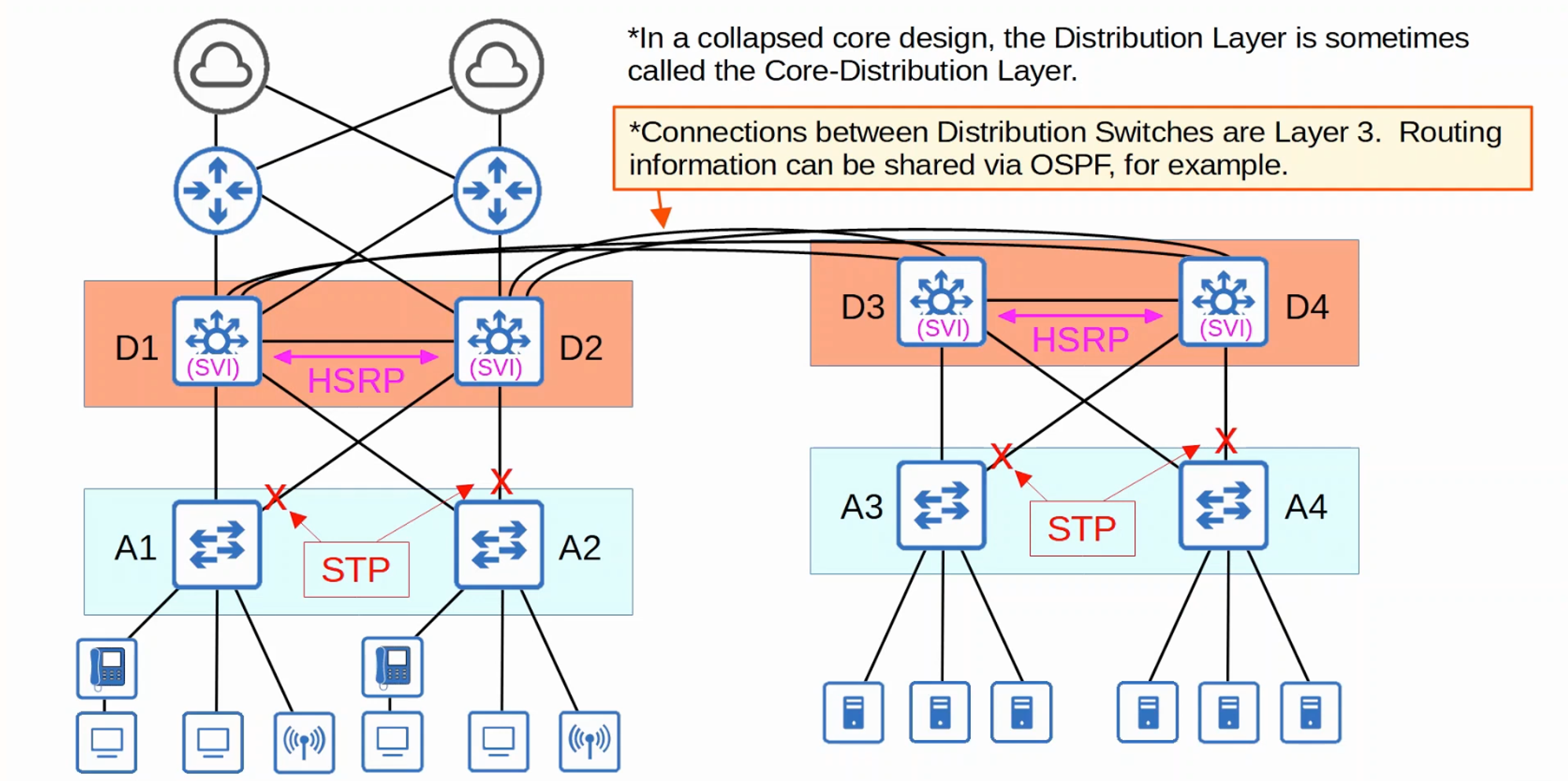
The layer that end hosts connect to (PCs, printers, cameras,AP’s, etc)
Typically Access Layer Switches have lots of ports for end hosts to connect to
QoS marking and security services like port security, DAI, etc are typically done here
Switchports might be PoE-enabled for wireless AP’s, IP phones, etc
Aggregates connections from the Access Layer Switches
Typically is the border between Layer 2 and Layer 3
Connects to services such as Internet, WAN, etc (in a two-tier design)
Connects Distribution Layers together in large LAN networks
The focus is speed (’fast transport’)
CPU-intensive operations such as security, QoS marking/classification, etc. should be avoided at this layer
Connections are all Layer 3 (No spanning tree)
2-Tier LAN
3-Tier LAN

Spine-Leaf (Data Center)

Small Office/Home Office (SOHO)

WAN Architectures
Network Automation
There are various tools/methods that can be used to automate tasks in the network
Software-Defined Networking (SDN)
Ansible, Puppet, Chef
Python scripts (traditional network architectures)
Scripts to push commands to many devices at once.
Python with Regular Expressions can parse through show commands to gather information about network devices.
Configuration Provisioning
It refers to how configuration changes are applied to devices, including new devices.
Traditionally, configuration provisioning is done by connecting to devices one-by-one via SSH, this is not practical in large networks.
Configuration management tools like Ansible, Puppet, and Chef allow us to make changes to devices on a mass scale with a fraction of the time/effort.
Two essential components:
hostname {{hostname}}
!
interface GigabitEthernet0/0
ip address {{address}} {{mask}}
ip ospf {{process_id}} area {{area}}
---
hostname: R1
address: 192.168.1.1
mask: 255.255.255.0
process_id: 1
area: 0
Ansible
Ansible is a configuration management tool written in Python and owned by Red Hat.
It is agentless (It doesn’t require any special software to run on the managed devices). It uses SSH to connect to devices, make configuration changes, extract information, etc.
Ansible uses a push model, the Ansible server (Control node) uses SSH to connect to managed devices and push configuration changes to them (Puppet and Chef use a pull model).
Ansible requires several text files:


Logical Planes
It forwards messages between networks by examining information in the Layer 3 header.
It uses a routing protocol like OSPF to share route information with other routers and build a routing table.
It uses ARP to build an ARP table, mapping IP addresses to MAC addresses.
It uses Syslog to keep logs of events that occur.
It allows a user to connect to it via SSH and manage it.
It forwards messages within a LAN by examining information in the Layer 2 header.
It uses STP to ensure there are no Layer 2 loops in the network.
It builds a MAC address table by examining the source MAC address of frames.
It uses Syslog to keep logs of events that occur.
It allows a user to connect to it via SSH and manage it.
The various functions of network devices can be logically divided up (categorized) into planes:
Data plane
Control plane
Management plane

The operations of the Management and Control plane are usually managed by the CPU of the device (relatively slow).
The data traffic of the Data plane is processed by specialized hardware called Application-Specific Integrated Circuit (ASIC) for maximum speed.
Software-Defined Networking (SDN)
SDN also called Software-Defined Architecture (SDA) or Controller-Based Networking, is an approach to networking to centralize the Control plane into an application called ‘controller’.

Soutbound Interface (SBI)
The SBI is used for communication between the controller and the network devices it controls using a communication protocol and the Application Programming Interface (API).
Examples of SBIs:
OpenFlow
Cisco OpFlex
Cisco onePK
NETCONF
Northbound Interface (NBI)
The NBI is what allows us to interact with the controller, access the data it gathers about the network, program it, and make changes in the network via the SBI.
A Representational State Transfer API (REST API) is used on the controller as an interface for apps to interact with it.
Data is sent in a structured (serialized) format such as Javascript Object Notation (JSON) or Extensible Markup Language (XML)

SDN Architecture

Cisco SDN Solutions
SD-Access for automating campus LANs.
Application Centric Infrastructure (ACI) for automating data center networks.
SD-WAN for automating WANs.
Cisco Digital Network Architecture (DNA) Center is the controller at the center of SD-Access.
Console Port Security
By default, no password is needed to access the CLI of a Cisco IOS device via the console port.
Cisco IOS console to Laptop
(Common configuration)
Serial Line: COM1
Speed: 9600
Data bits: 8
Stop bits: 1
Parity: None
Flow Control: None
## Macbook macOS through Serial Console Cable ##
% cd /dev
% ls -l | grep usb
# grep tty devices result
% screen tty.usbserial-xxxxxxxx 9600
Switch>
# or:
% ls /dev/*usb*
# ls tty devices result
% screen /dev/tty.usbserial-xxxxxxx 9600
Switch>
## Windows PC through Serial Console Cable ##
# download PuTTY
# Serial Line COMX (Check Device Manager)
# Speed 9600
Switch>
Switch tty1 is now available
Press RETURN to get started
# Option 1
Router> enable
Router# configure terminal
Router(config)# line console 0
Router(config-line)# password Password123!
Router(config-line)# login
Router(config-line)# end
Router# exit
# Option 2 (preferred)
Router> enable
Router# configure terminal
Router(config)# username myuser secret Password123!
Router(config)# line console 0
Router(config-line)# login local # Require username and password to login
Router(config-line)# logging synchronous # Logging messages
Router(config-line)# exec-time out 3 30 # 3 minutes, 30 seconds
Router(config-line)# end
Router# exit
Router con0 is now available
Press RETURN to get started.
User Access Verification
Password:
Router>
Appendix 1: Cisco IOS Commands
Switch tty1 is now available
Press RETURN to get started
Switch> enable
Switch# show ? # Available options for show command
Switch# show clock ? # Available options for show clock command
Switch# show clock de # Press Tab to Autocomplete
Switch# show clock detail
Switch# show version # Version of Cisco IOS Software
Switch# show flash
Switch# show file systems
Switch# show running-config # Show whole device configuration
Switch# show interface description
Switch# show run interface fastEthernet 0/48
Switch# show run interface gi4/0/39
Switch# show ip interface brief
#Interface IP-Address OK? Method Status Protocol
#GigabitEthernet0/0 unassigned YES unset administratively down down
#GigabitEthernet0/1 unassigned YES unset administratively down down
#GigabitEthernet0/2 unassigned YES unset administratively down down
#GigabitEthernet0/3 unassigned YES unset administratively down down
Switch# show interfaces status # Works only in Switches (Not Routers)
#Port Name Status Vlan Duplex Speed Type
#Fa0/1 connected 1 auto auto 10/100BaseTX
#Fa0/2 notconnected 1 auto auto 10/100BaseTX
#Gig0/1 connected 1 auto auto 10/100/1000BaseTX
Switch# sh interfaces # Detailed view of each of all interfaces
Switch# sh interfaces g0/0 # Detailed view of g0/0 interface
Switch# sh interfaces | include address # Filter by "address" (mac address)
Switch# sh ip int brief | inc down # Filter by "down"
Switch# sh port-security # Show port-security configuration on interfaces
Switch# sh port-security address # Show mac address attached on port interfaces
Switch# sh mac address-table # Show Mac Address Table in the Switch
# MAC Address Table
#------------------------------------------------
#Vlan Mac Address Type Ports
#---- -------------- ------- -----
# 1 0c2f.b011.9d00 DYNAMIC Gi0/0
# 1 0c2f.b06a.3900 DYNAMIC Gi0/2
Switch# clear mac address-table dynamic # Clear the Mac Address Table in the Switch
Switch# show cdp neighbors
Switch# show interfaces trunk
# Configure IP address
Switch# configure terminal
Switch(config)# interface vlan1 # Configure Switch Virtual Interface (SVI)
Switch(config-if)# ip address 192.168.1.253 255.255.255.0 # Assign IP address to switch (for remote access and management)
Switch(config-if)# no shutdown
Switch(config)# ip default-gateway 192.168.1.254
# Hostname
Switch(config)# hostname SW3750 # Change hostname to "SW3750"
SW3750(config)# do show clock # Force show global command to work in Config mode
# Secure Shell SSH
CISCO# show ip ssh
CISCO# configure terminal
CISCO(config)# ip domain-name networkdirection.com # The FQDN of the device is used to name the RSA keys.
CISCO(config)# crypto key generate rsa
#The name for the keys will be: CISCO.networkdirection.com
#Choose the size of the key modulus...
#How many bits in the modulus [512]: 2048
#%Generating 2048 bits RSA keys...
#* Feb 21 00:23:40: %SSH-5-ENABLED: SSH 1.99 has been enabled
# Virtual Tele Type (VTY) Telnet/SSH Switch/Router ##
CISCO(config)# enable secret P4$$w0rd # Set P4$$w0rd to enable in the device
CISCO(config)# username myusername privilege 15 secret P4$$w0rd # Create user "myusername" with full access and assign P4$$w0rd
CISCO(config)# access-list 1 permit host 192.168.2.1 # Optional ACL to allow only certain host to login
CISCO(config)# line vty 0 15 # Enable Virtual Terminal Lines (remote login)
CISCO(config)# ip ssh version 2
CISCO(config-line)# login local
CISCO(config-line)# exec-timeout 5 0
CISCO(config-line)# transport input ssh # Allow only SSH connections
CISCO(config-line)# access-class 1 in # Apply ACL in VTY (different from ip access-group to apply an ACL to an Interface)
CISCO(config-line)# exit
#Virtual Local Area Network (VLAN)
Switch# show vlan
Switch# sh vlan brief
# VLAN Name Status Ports
# ---- ----------------------- ------- ---------------------------
# 1 default active Gi0/0, Gi0/1, Gi0/2, Gi0/3
# Gi2/3
# 10 VLAN0010 active Gi1/0, Gi1/1, Gi1/2, Gi1/3
# 20 VLAN0020 active Gi2/0, Gi2/1, Gi2/2
# 30 VLAN0030 active Gi3/0, Gi3/1, Gi3/2, Gi3/3
SW3750(config)# vlan 123 # Create VLAN
SW3750(config-vlan)# name Vlan_Name # Name VLAN
SW3750(config)# interface fastEthernet 0/48
SW3750(config)# interface gi4/0/39
SW3750(config-if)# switchport mode access # (Access port vs Trunk port)
SW3750(config-if)# switchport access vlan 123 # Assign port to VLAN
SW3750(config)# interface range g1/0 - 3 # Select a range of interfaces
SW3750(config-if-range)# switchport mode access
Sw3750(config-if-range)# switchport access vlan 123
# Trunks
SW3750(config-if)# switchport trunk encapsulation dot1q # IEEE 802.1Q encapsulation standard
SW3750(config-if)# switchport mode trunk # (Access port vs Trunk port)
SW3750(config-if)# switchport trunk allowed vlan 10,30
SW3750(config-if)# switchport trunk allowed vlan add 20
SW3750(config-if)# switchport trunk allowed vlan remove 20
SW3750(config-if)# switchport trunk native vlan 1001 # Change native vlan 1 to 1001 (security purposes)
SW3750(config-if)# do show interfaces trunk
SW3750(config-if)# switchport port-security # Enable Port Security (is enabled but not configured)
SW3750(config-if)# switchport port-security maximum 1 # Allow just 1 mac address in the interface
SW3750(config-if)# sw port-security mac-address sticky # Allow just the first mac address connected to the interface
SW3750(config-if)# sw port-security violation ? # protect, restrict, or shutdown
SW3750(config-if)# shutdown # Shutdown the interface
SW3750(config-if)# no shutdown # Turn on the interface
#*Feb 20 23:40:40: %LINK-3-UPDOWN: Interface GigabitEthernet0/1, changed state to up
SW3750(config-if)# exit
SW3750(config)# exit # Or keyboard shortcut Ctrl+Z to go back in prompt
#* Feb 20 23:25:40: %sys-5-CONFIG: Configured from console by console # Timestamp config log record
SW3750# copy running-config startup-config # Save configuration in the Switch or Router
SW3750# copy run start # Same (Short version)
Sw3750# write memory # Same (Short version)
## Multilayer Switch ##
L3SW# show redundancy
L3SW# show environment
L3SW(config)# default interface g0/1 # Reset to default interface configuration
L3SW(config)# ip routing # Enable Layer 3 routing functionality on the switch
L3SW(config)# interface g0/1
L3SW(config-if)# no switchport # Configure interface as 'routed port' (L3 port not L2 Switchport)
L3SW(config-if)# ip address 192.168.1.193 255.255.255.252
L3SW# show ip interface brief
L3SW(config)# ip route 0.0.0.0 0.0.0.0 192.168.1.194 # Default route to next hop (to router)
L3SW# show ip route
# Gateway of last resort is 192.168.1.194 to network 0.0.0.0
# S* 0.0.0.0/0 [1/0] via 192.168.1.194
# 192.168.1.0/24 is variably subnetted, 2 subnets, 2 masks
# C 192.168.1.192/30 is directly connected, GigabitEthernet0/1
# L 192.168.1.193/32 is directly connected, GigabitEthernet0/1
## Inter-VLAN Routing via Switch Virtual Interfaces SVI ##
L3SW(config)# interface vlan10
L3SW(config-if)# ip address 192.168.1.62 255.255.255.192
L3SW(config-if)# no shutdown
L3SW(config)# interface vlan20
L3SW(config-if)# ip address 192.168.1.126 255.255.255.192
L3SW(config-if)# no shutdown
L3SW# show interfaces status
## Spanning Tree Protocol STP
L3SW# show spanning-tree
L3SW(config)# spanning-tree mode ?
# mst Multiple spanning tree mode
# pvst Per-Vlan spanning tree mode
# rapid-pvst Per-Vlan rapid spanning tree mode
## EthernetChannel
ASW1# show ethernetchannel load-balance # Show EthernetChannel load balancing configuration
ASW1(config)# port-channel load-balance <method> # Configure EthernetChannel load balancing method
ASW1(config)# interface range g0/0 - 3
ASW1(config-if-range)# channel-group 1 mode <mode> # Configure EtherChannel
ASW1# show etherchannel summary
ASW1# show etherchannel port-channel
## SHOW Router #
Router# show running-config # Or show run (Show whole device configuration)
Router# show ip interface brief
Router# show ip route
## DHCP Router ##
Router# conf t
Router(config)# ip dhcp pool <name> # Create pool (new network)
Router(dhcp-config)# network 10.1.1.0 255.255.255.0 # New network address and subnetmask
Router(dhcp-config)# default-router 10.1.1.254 # Specify default gateway (Same of the router)
Router(dhcp-config)# dns-server 10.1.1.254
Router(dhcp-config)# lease <days>
Router(dhcp-config)# domain-name <domain.com>
Router(config)# ip dhcp excluded-address <ip>
Router# show ip dhcp pool # Pool (DHCP Scope configuration)
#Pool <name>:
# Utilization mark (high/low) : 100 / 0
# Subnet size (first/next) : 0 / 0
# Total addresses : 254
# Leased addresses : 0
# Pending event : none
# 1 subnet is currently in the pool :
# Current index IP address range Leased addresses
# 10.1.1.1 10.1.1.1 - 10.1.1.254 0
Router# sh ip dhcp binding # ip addresses allocated
#Binding from all pools not associated with VRF:
# IP address Client-ID/ Lease expiration Type
# Hardware address/
# User name
# 10.1.1.101 0100.0c29.bd80.b0 Mar 27 2023 03:49 PM Automatic
Router# sh ip dhcp server statistics
## INTERFACE Router ##
Router# conf t
Router(config)# interface gigabit 0/1
Router(config-if)# description Corporate Network # Description "Corporate Network"
Router(config-if)# ip address 192.168.0.1 255.255.255.0 # Set IP Address
Router(config-if)# speed 1000 # Interface speed 1Gb/s (Default Auto)
Router(config-if)# duplex full # Duplex mode (Default Auto)
Router(config-if)# shutdown # Shutdown the interface
Router(config-if)# no shutdown # Turn on the interface
#*Feb 20 23:40:40: %LINK-3-UPDOWN: Interface GigabitEthernet0/1, changed state to up
Router# show ip interface brief
#Interface IP-Address OK? Method Status Protocol
#GigabitEthernet0/0 10.255.5.91 YES NVRAM administratively down down
#GigabitEthernet0/1 unassigned YES unset administratively down down
## INTERFACE LOOPBACK - ##
Router(config)# interface loopback0 # Create a loopback interface
#*Feb 20 23:51:40: %LINK-3-UPDOWN: Line protocol on Interface Loopback0, changed state to up
Router# show ip interface brief
#Interface IP-Address OK? Method Status Protocol
#GigabitEthernet0/0 10.255.5.91 YES NVRAM administratively down down
#GigabitEthernet0/1 192.168.0.1 YES manual up up
#Loopback0 172.16.0.1 YES manual up up
## Router on a Stick (ROAS) - Multiple VLANs on a single interface ##
R1(config)# interface g0/0
R1(config-if)# no shutdown
R1(config-if)# interface g0/0.10
R1(config-subif)# encapsulation dot1q 10 # Attach VLAN 10 to the interface
R1(config-subif)# ip address 192.168.1.62 255.255.255.192
R1(config-subif)# encapsulation dot1q 10 native # Make 10 the native VLAN on the Router sub-interface (Method 1 for native VLAN)
R1(config)# no interface g0/0.10 # Delete sub-interface
R1(config)# interface g0/0
R1(config-if)# ip address 192.168.1.62 255.255.255.192 # Configure IP address on the Router's physical interface (Method 2 for native VLAN)
R1(config-subif)# interface g0/0.20
R1(config-subif)# encapsulation dot1q 20 # Attach VLAN 20 to the interface
R1(config-subif)# ip address 192.168.1.126 255.255.255.192
R1(config)# no interface g0/0.10 # Delete sub-interface
R1(config)# default interface g0/0 # Reset to default the interface
## IP ROUTE Router Static ##
R1(config)# ip route <ip-address> <netmask> <next-hop> # Static Route method 1
R1(config)# ip route <ip-address> <netmask> <exit-interface> # Static Route method 2
R1(config)# ip route <ip-address> <netmask> <exit-interface> <next-hop> # Static Route method 3
R1(config)# ip route 192.168.4.0 255.255.255.0 192.168.13.3 # Static Route
R2(config)# ip route 192.168.1.0 255.255.255.0 g0/0 # Static Route
R2(config)# ip route 192.168.4.0 255.255.255.0 g0/1 192.168.24.4 # Static Route
R1(config)# ip route 0.0.0.0 0.0.0.0 <next-hop-to-internet> # Default Route
R1(config)# ip route 0.0.0.0 0.0.0.0 203.0.113.2
R1# show ip route
#Codes: L - local, C - connected, S - static, R - RIP, M - mobile, B - BGP
# D - EIGRP, EX - EIGRP external, O - OSPF, IA - OSPF inter area
# N1 - OSPF NSSA external type 1, N2 - OSPF NSSA external type 2
# E1 - OSPF external type 1, E2 - OSPF external type 2
# * - candidate default
#Gateway of last resort is 203.0.113.2 to network 0.0.0.0
# S* 0.0.0.0/0 [1/0] via 203.0.113.2
# 192.168.1.0/24 is variably subnetted, 2 subnets, 2 masks
# C 192.168.1.0/24 is directly connected, GigabitEthernet0/2
# L 192.168.1.1/32 is directly connected, GigabitEthernet0/2
# S 192.168.4.0/24 [1/0] via 192.168.13.3
## OSPF Routing ##
show ip route
show ip protocols
show running-config | section ospf
show ip ospf neighbor
show ip ospf database
debug ip ospf adj
debug ip ospf events
clear ip ospf process
clear ip ospf neighbor
R1(config)# router ospf 1 # Enable OSPF on a router with the process ID 1
R1(config-router)# network 10.0.12.0 0.0.0.3 area 0 # Configure OSPF in all interfaces within that network
R1(config-router)# network 10.0.13.0 0.0.0.3 area 0
R1(config-router)# network 172.16.1.0 0.0.0.15 area 0
R1(config)# interface [interface-id]
R1(config-if)# ip ospf [process-id] area [area-id] # Configure OSPF directly on an interface
R1(config-router)# passive-interface g2/0 # Stop sending OSPF 'hello' messages out of the interface (if the interface is not connected to another router)
R1(config)# ip route 0.0.0.0 0.0.0.0 203.0.113.2 # Connect to internet
R1(config-router)# default-information originate # The router will become an ASBR router
R1(config-router)# router-id ?
# A.B.C.D OSPF router-id in IP address format
R1(config-router)# router-id 1.1.1.1
R1# clear ip ospf process
# Two ways to modify the OSPF cost
R1(config-router)# auto-cost reference-bandwith <megabits-per-second> # Change reference bandwidth (much greater than the fastest interface)
R1(config-if)# ip ospf cost <cost> # Manual configuation in the interface
R1# show ip ospf interface brief
R1# show ip ospf interface g0/0
## Access Controls Lists ACLs ##
## Standard Numbered ACLs ##
R1(config)# access-list number {deny | permit} ip wildcard-mask
R1(config)# access-list 1 permit 192.168.1.1 # Permit only that host
R1(config)# access-list 1 deny 192.168.1.0 0.0.0.255 # Deny network with the wild card /24
R1(config)# access-list 1 permit any # To avoid the default configuration "deny all" in any other network
R1(config)# interface g0/2
R1(config-if)# ip access-group 1 out # Outbound (Standard ACLs should be applied as close to the destination as possible)
## Standard Named ACLs ##
R1(config)# ip access-list standard acl-name
R1(config-std-nacl)# [entry-number] {deny | permit} ip wildcard-mask
R1(config)# ip access-list standard BLOCK_BOB
R1(config-std-nacl)# 5 deny 1.1.1.1
R1(config-std-nacl)# 10 permit any
R1(config-std-nacl)# remark ## CONFIGURED NOV 21 2020 ##
R1(config)# interface g0/0
R1(config-if)# ip access-group BLOCK_BOB in
## Extended Numbered ACLs ##
R1(config)# access-list number {permit | deny} protocol src-ip dest-ip
## Extended Named ACLs ##
R1(config)# ip access-list extended {name | number}
R1(config-ext-nacl)# [seq-number] {deny | permit} protocol src-ip dest-ip
R1(config-ext-nacl)# deny udp 10.0.0.0 0.0.255.255 host 192.168.1.1
R1(config-ext-nacl)# deny icmp host 172.16.1.1 192.168.0.0 0.0.255.255
R1# show access-list
R1# show running-config | section access-list
## Network Time Protocol NTP ##
R1(config)# ntp server 216.239.35.0 # Google's address
R1(config)# ntp server 216.239.35.4
R1(config)# ntp server 216.239.35.8
R1(config)# ntp server 216.239.35.12
R1# show ntp associations
R1# show ntp status
R1# show clock
R1# show clock detail
## DNS in Cisco IOS ##
R1(config)# ip name-server 8.8.8.8
R1(config)# ip domain lookup
## Dynamic Host Configuration Protocol DHCP ##
# Router as a server
R1(config)# ip dhcp excluded-address 192.168.1.1 192.168.1.10 # Specify a range of addresses that won't be given
R1(config)# ip dhcp pool LAB_POOL # Create pool
R1(dhcp-config)# network 192.168.1.0 /24
R1(dhcp-config)# dns-server 8.8.8.8 # Specify the DNS server that DHCP clients should use
R1(dhcp-config)# domain-name mydomain.com # Specify the domain name of the network (ie. PC1 = pc1.mydomain.com)
R1(dhcp-config)# default-router 192.168.1.1 # Specify the default gateway
R1(dhcp-config)# lease 0 5 30 # Specify the lease time (days hours minutes)
R1# show ip dhcp binding # Show allocated address to clients
# Router as a Relay Agent
R1(config)# interface g0/1
R1(config-if)# ip helper-address 192.168.10.10
R1# show ip interface g0/1
## Syslog ##
R1# show logging
R1(config)# logging 192.168.1.100 # Configure a logging server
R1# terminal monitor # Enable Syslog messages when connecting via Telnet or SSH
R1(config)# line console 0
R1(config-line)# logging synchronous
CISCO(config)# banner login # # Configure Banners
CISCO(config)# banner motd #
*******************************************************
WARNING - PRIVATE ELECTRONIC DEVICE - ACCESS PROHIBITED
Access to this device is not authorized.
Any attempt for unauthorized access will be logged
and appropriate legal action will be taken.
*******************************************************#
# Write Memory
CISCO# copy running-config startup-config # Save configuration in the Switch or Router
CISCO# copy run start # Same (Short version)
CISCO# write memory # Same (Short version)
# Update Firmware FTP or TFTP
R1(config)# ip ftp username myusername
R1(config)# ip ftp password Password123!
R1# copy ftp: flash: # Copy FTP source destination
# Address or name of remote host []? 192.168.1.1
# Source filename []? # File_name.bin
# Destination filename []? # return to use same name
R1# copy tftp: flash: # Copy TFTP source destination
# Address or name of remote host []? 192.168.1.1
# Source filename []? # File_name.bin
# Destination filename []? # return to use same name
R1# show flash
R1(config)# boot system flash:File_name.bin
R1(config)# exit
R1# write memory
R1# reload
R1# delete flash:OldFile_name.bin
# Network Address Tranlation (NAT) PAT:
R1(config)# interface g0/1
R1(config-if)# ip nat inside
R1(config)# interface g0/0
R1(config-if)# ip nat outside
R1(config)# access-list 1 permit 192.168.0.0 0.0.0.255
#PAT 1:
R1(config)# ip nat pool POOL1 100.0.0.0 100.0.0.3 prefix-length 24
R1(config)# ip nat inside source list 1 pool POOL1 overload # Configure Port Address Translation (PAT)
#PAT 2: (preferred)
R1(config)# ip nat inside source list 1 interface g0/0 overload # Configure Port Address Translation (PAT)
R1# show ip nat translations # PAT is widely used instead of static or dynamic
R1# show ip nat statistics
## Voice VLANs
SW1(config)# interface g0/0
SW1(config-if)# switchport mode access
SW1(config-if)# switchport access vlan 10
SW1(config-if)# switchport voice vlan 11
SW1# show interfaces g0/0 switchport
## Port Security
SW1(config-if)# switchport mode access
SW1(config-if)# switchport port-security # Enable Port security with default (shutdown)
SW1(config-if)# switchport port-security mac-address A.A.A. # Manually attach mac address to port
Sw1(config-if)# switchport port-security mac-address sticky. # Port learns mac address automatically
SW1(config-if)# switchport port-security violation shutdown # Default
SW1(config-if)# switchport port-security violation restrict # Dropp packets without turning off the interface
SW1# show port-security int g0/1
SW1# show mac address-table secure
Appendix 2: CCNA Mega Lab
Router> enable
Router# configure terminal
## Hostname
Router(config)# hostname R1
R1(config)# do write memory
## Enable password
R1(config)# enable ? # To see the options available
# password Assign the privileged level password
# secret Assign the privileged level secret. # Type 5 (MD5)
R1(config)# enable secret Password123!
R1(config)# do show run | include secret
# enable secret 5 $UQSVhFFvZCpdZnhsECDjG9jn98tR/
CSW1(config)# enable ? # To see the options available
# algorithm-type Algorithm to use for hashing the plaintext 'enable' secret # Type 9 Hashing
# password Assign the privileged level password
# secret Assign the privileged level secret. # Type 5 (MD5)
CSW1(config)# enable algorithm-type scrypt secret Password123!
CSW1(config)# do sh run | i secret
# enable secret 9 $9$CU6vC5NasL2FH$ApaMpir4WhZH.58RqGsGNJn2UVSFo6zwzSLcZFhB5.MTg
## Local user password
R1(config)# username cisco secret ccna
CSW1(config)# username cisco algorithm-type scrypt secret ccna
## Console access
R1(config)# line console 0
R1(config-line)# login local # Require local user to login
R1(config-line)# logging synchronous
R1(config-line)# exec-timeout 30 # 30 minutes
## Etherchannel
DSW-A1# show cdp neighbors
DSW-A1(config)#int range g1/0/4-5
DSW-A1(config-if-range)# channel-group 1 mode desirable # Cisco Port Aggregation Protocol (PAgP)
DSW-B2(config-if-range)# channel-group 1 mode active # Open Standard Link Aggregation Control Protocol (LACP)
DSW-A1# show etherchannel summary
## Trunks
DSW-A1# show cdp neighbors
DSW-A1(config)# int range g1/0/1-3 # To access switches
DSW-A1(config-if-range)# switchport mode trunk
DSW-A1(config-if-range)# switchport nonegotiate # Disable Dynamic Trunking Protocol DTP
DSW-A1(config-if-range)# sw trunk native vlan 1000 # Native unused vlan (security purposes)
DSW-A1(config-if-range)# sw tr allowed vlan 10,20,40,99
DSW-B2(config-if-range)# sw tr allowed vlan 10,20,30,99
DSW-A1(config)# int port-channel1 # To the other distribution switch
DSW-A1(config-if)# sw mode trunk
DSW-A1(config-if)# sw nonegotiate
DSW-A1(config-if)# sw trunk native vlan 1000
DSW-A1(config-if)# sw tr allowed vlan 10,20,40,99
DSW-B2(config-if)# sw tr allowed vlan 10,20,30,99
ASW-A1(config)# interface range g0/1-2
ASW-A1(config-if-range)# switchport mode trunk
ASW-A1(config-if-range)# switchport nonegotiate
ASW-A1(config-if-range)# switchport trunk native vlan 1000
ASW-A1(config-if-range)# switchport trunk allowed vlan 10,20,40,99
ASW-B2(config-if-range)# switchport trunk allowed vlan 10,20,30,99
## VLAN Trunking Protocol VTPv2 Server
DSW-A1# show vtp status
DSW-A1(config)# vtp domain JeremysITLab
DSW-A1(config)# vtp version 2 # Server
ASW-A3(config)# vtp mode client # Client
## VLANs
DSW-A1# show vlan brief
DSW-A1(config)# vlan 10
DSW-A1(config-vlan)# name PCs
DSW-A1(config-vlan)# vlan 20
DSW-A1(config-vlan)# name Phones
DSW-A1(config-vlan)# vlan 40
DSW-A1(config-vlan)# name Wi-Fi
DSW-A1(config-vlan)# vlan 99
DSW-A1(config-vlan)# name Management
DSW-B1(config)# vlan 10
DSW-B1(config-vlan)# name PCs
DSW-B1(config-vlan)# vlan 20
DSW-B1(config-vlan)# name Phones
DSW-B1(config-vlan)# vlan 30
DSW-B1(config-vlan)# name Servers
DSW-B1(config-vlan)# vlan 99
DSW-B1(config-vlan)# name Management
## Access Switches
ASW-A1# sh cdp neig
ASW-A1# sh ip int brief
ASW-A1# sh vlan brief
ASW-A1(config)# int f0/1
ASW-A1(config-if)# sw mode access # It automatically disable DTP
ASW-A1(config-if)# sw nonegotiate # It explicity disable DTP
ASW-A1(config-if)# sw acc vlan 99
ASW-A1(config)# int f0/2
ASW-A1(config-if)# sw mode trunk
ASW-A1(config-if)# sw trunk allowed vlan 40,99
ASW-A1(config-if)# sw trunk native vlan 99
ASW-A1(config-if)# sw nonegotiate
ASW-A2(config)# int f0/1
ASW-A2(config-if)# sw mode access
ASW-A2(config-if)# sw nonegotiate
ASW-A2(config-if)# sw access vlan 10
ASW-A2(config-if)# sw voice vlan 20
## Disable unused ports (security)
DSW-A1(config)# int range g1/0/6-24,g1/1/3-4
DSW-A1(config-if-range)# shutdown
ASW-A2(config)# int range f0/2-24
ASW-A2(config-if-range)# shutdown
## R1 - ISP interfaces (DHCP Client)
R1(config)# int range g0/0/0,g0/1/0
R1(config-if-range)# ip address dhcp
R1(config-if-range)# no shutdown
## R1 - Core Switches
R1(config)# int g0/0
R1(config-if)# ip address 10.0.0.33 255.255.255.252
R1(config-if)# no shutdown
R1(config)# int g0/1
R1(config-if)# ip address 10.0.0.37 255.255.255.252
R1(config-if)# no shutdown
## R1 Interface Loopback0
R1(config)# interface loopback0
R1(config-if)# ip address 10.0.0.76 255.255.255.255
## IPv4 Routing Core and Distribution Switches
CSW1(config)# ip routing
DSW-A1(config)# ip routing
## EtherChannel Core Switches
CSW1# sh cdp neig
CSW1(config)# int range g1/0/2-3
CSW1(config-if-range)# no switchport # Convert to L3 Routing ports
CSW1(config-if-range)# channel-group 1 mode desirable # Cisco Port Aggregation Protocol (PAgP)
CSW1(config)# do sh ip int brief
CSW1(config)# int p1
CSW1(config-if)# ip address 10.0.0.41 255.255.255.252
CSW1# sh etherchannel summary
## IP addresses Core Switches
CSW1(config)# int g1/0/1
CSW1(config-if)# no switchport
CSW1(config-if)# ip address 10.0.0.34 255.255.255.252
configure terminal
interface g1/1/1
no switchport
ip address 10.0.0.45 255.255.255.252
interface g1/1/2
no switchport
ip address 10.0.0.49 255.255.255.252
interface g1/1/3
no switchport
ip address 10.0.0.53 255.255.255.252
interface g1/1/4
no switchport
ip address 10.0.0.57 255.255.255.252
interface loopback0
ip address 10.0.0.77 255.255.255.255
interface range g1/0/4-24
shutdown
exit
## IP addresses Distribution Switches
DSW-A1(config)# int g1/1/1
DSW-A1(config-if)# no switchport
DSW-A1(config-if)# ip address 10.0.0.46 255.255.255.252
DSW-A1(config)# int g1/1/2
DSW-A1(config-if)# no switchport
DSW-A1(config-if)# ip address 10.0.0.62 255.255.255.252
DSW-A1(config)# int loopback0
DSW-A1(config-if)# ip address 10.0.0.79 255.255.255.255
## IP management Access Switches
ASW-A1(config)# ip default-gateway 10.0.0.1
ASW-A1(config)# interface vlan 99
ASW-A1(config-if)# ip address 10.0.0.4 255.255.255.240
ASW-B1(config)# ip default-gateway 10.0.0.17
ASW-B1(config)# int vlan 99
ASW-B1(config-if)# ip address 10.0.0.20 255.255.255.240
## Hot Standby Router Protocol HSRP (Distribution Redundancy)
DSW-A1(config)# int vlan 99
DSW-A1(config-if)# ip address 10.0.0.2 255.255.255.240
DSW-A1(config-if)# standby version 2 # Activate HSRPv2
DSW-A1(config-if)# standby 1 ip 10.0.0.1 # Virtual IP address
DSW-A1(config-if)# standby 1 priority 105 # Increase priority to become the active switch
DSW-A1(config-if)# standby 1 preempt # It will become the active sw as long is up and running
DSW-A1# show standby
DSW-A1(config)# int vlan 10 # It should be done in every vlan
DSW-A1(config-if)# ip address 10.1.0.2 255.255.255.0
DSW-A1(config-if)# standby version 2 # Activate HSRPv2
DSW-A1(config-if)# standby 2 ip 10.0.0.1 # Virtual IP address
DSW-A1(config-if)# standby 2 priority 105 # Increase priority to become the active switch
DSW-A1(config-if)# standby 2 preempt # It will become the active sw as long is up and running
DSW-A1# show standby
## Rapid Per Vlan Spanning Tree PVST+ Protocol
DSW-A1# show spanning-tree
# Spanning tree enabled protocol ieee # Regular STP running
DSW-A1(config)# spanning-tree mode rapid-pvst # Activate Rapid PVST+
ASW-A1(config)# spanning-tree mode rapid-pvst
DSW-A1(config)# spanning-tree vlan 10,99 priority 0 # Make it the root bridge (lowest priority)
DSW-A1(config)# spanning-tree vlan 20,40 priority 4096 # Matching HRSP Active/Standby router
DSW-A2(config)# spanning-tree vlan 20,40 priority 0
DSW-A2(config)# spanning-tree vlan 10,99 priority 4096
ASW-A1(config)# int f0/1 # Connected to LWAP1
ASW-A1(config-if)# spanning-tree portfast # To avoid 30sec delay in ports connected to endpoints
ASW-A1(config-if)# spanning-tree bduguard enable # To disable port if a switch is connected
## Dynamic Routing (OSPF)
R1# show ip ospf
R1(config)# router ospf 1 # Process ID
R1(config-router)# router-id 10.0.0.76 # The IP address of its Loopback interface
R1(config-router)# passive-interface l0
R1(config-router)# interface loopback0
R1(config-if)# ip ospf 1 area 0
R1# show ip int brief
R1(config)# int range g0/0-1 # Select Core Switches interfaces
R1(config-if-range)# ip ospf 1 area 0 # Activate OSPF in Core Switches interfaces
R1(config-if-range)# ip ospf network point-to-point # Network type
CSW1(config)# router ospf 1
CSW1(config-router)# router-id 10.0.0.77 # Same IP address of its loopback interface
CSW1(config-router)# passive-interface loopback0
CSW1(config-router)# do sh ip int brief | exclude un # Show only active interfaces
CSW1(config-router)# network 10.0.0.41 0.0.0.0 area 0 # Activate area 0 in port-channel int
CSW1(config-router)# network 10.0.0.34 0.0.0.0 area 0 # Activate area 0 in R1 int
CSW1(config-router)# network 10.0.0.45 0.0.0.0 area 0 # Activate area 0 in DSW-A1 int
CSW1(config-router)# network 10.0.0.49 0.0.0.0 area 0 # Activate area 0 in DSW-A2 int
CSW1(config-router)# network 10.0.0.53 0.0.0.0 area 0 # Activate area 0 in DSW-B1 int
CSW1(config-router)# network 10.0.0.57 0.0.0.0 area 0 # Activate area 0 in DSW-B2 int
CSW1(config-router)# network 10.0.0.77 0.0.0.0 area 0 # Activate area 0 in loopback0 int
CSW1(config)# int range g1/0/1,g1/1/1-4
CSW1(config-if-range)# ip ospf network point-to-point # Network type in all physical interfaces
DSW-A1(config)# router ospf 1
DSW-A1(config-router)# router-id 10.0.0.79
DSW-A1(config-router)# passive-interface loopback0
DSW-A1(config-router)# passive-interface vlan 10
DSW-A1(config-router)# passive-interface vlan 20
DSW-A1(config-router)# passive-interface vlan 40
DSW-A1(config-router)# network 10.0.0.46 0.0.0.0 area 0
DSW-A1(config-router)# network 10.0.0.62 0.0.0.0 area 0
DSW-A1(config-router)# network 10.0.0.79 0.0.0.0 area 0
DSW-A1(config-router)# network 10.0.0.2 0.0.0.0 area 0
DSW-A1(config-router)# network 10.1.0.2 0.0.0.0 area 0
DSW-A1(config-router)# network 10.2.0.2 0.0.0.0 area 0
DSW-A1(config-router)# network 10.6.0.2 0.0.0.0 area 0
DSW-A1(config)# interface range g1/1/1-2
DSW-A1(config-if-range)# ip ospf network point-to-point
DSW-A2# show ip ospf neighbor
## Static Routing (Default gateway to Internet)
R1# sh cdp neighbor detail
R1# sh ip ospf neighbor
R1# sh ip int brief
R1(config)# ip route 0.0.0.0 0.0.0.0 203.0.113.1 # Static route to next hop "Internet" (Default gateway)
R1(config)# ip route 0.0.0.0 0.0.0.0 203.0.113.5 2 # AD of 2 (default of 1 for static routes) (Redundancy)
R1(config)# router ospf 1
R1(config-router)# default-information originate # Autonomous System Boundary Router (ASBR), to advertize the connection to internet to the other routers in the ospf area
## DHCP
R1(config)# ip dhcp excluded-address 10.0.0.1 10.0.0.10. # Range of IP excluded of dhcp pool
R1(config)# ip dhcp pool sales # Create the "sales" dhcp pool
R1(dhcp-config)# network 10.0.0.0 255.255.255.240 # network address /28 for dhcp pool
R1(dhcp-config)# default-router 10.0.0.1
R1(dhcp-config)# domain-name abrstudio.net
R1(dhcp-config)# dns-server 10.5.0.4
R1(dhcp-config)# option 43 ip 10.0.0.7 # Option 43 code (WLC)
DSW1(config)# int vlan 10
DSW1(config-if)# ip helper-address 10.0.0.76 # Relay dhcp agent point to R1 L0 address
DSW1(config)# int vlan 99 # Relay agent on each vlan
DSW1(config-if)# ip helper-address 10.0.0.76
R1# show ip dhcp binding
R1# show ip dhcp pool
## DNS (Server1)
@ records # Add all the DNS translations in Server 1
CNAME records
## Domain Name and DNS server (all devices)
R1(config)# ip domain name abrstudio.net
R1(config)# ip name-server 10.5.0.4
CSW1(config)# ip domain name abrstudio.net
CSW1(config)# ip name-server 10.5.0.4
DSW-A1(config)# ip domain name abrstudio.net
DSW-A1(config)# ip name-server 10.5.0.4
ASW-A1(config)# ip domain name abrstudio.net
ASW-A1(config)# ip name-server 10.5.0.4
## Network Time Protocol NTP
R1(config)# ntp master 5 # Make R1 a stratum 5 NTP server
R1(config)# ntp server 216.239.35.0 # (not sure about the IP address)
R1(config)# ntp authentication-key 1 md5 ccna # Create ntp auth key (for switches)
R1(config)# ntp trusted-key 1 # Create trusted key 1
CSW1(config)# ntp authentication-key 1 md5 ccna # Same key for access
CSW1(config)# ntp trusted-key 1
CSW1(config)# ntp server 10.0.0.76 key 1 # Using key 1 to connect to R1 ntp server
ASW-A1# show ntp status
## Simple Network Message Protocol SNMP
R1(config)# snmp-server community SNMPSTRING ro # Join SNMPSTRING snmp community (read-only) (all devices)
## Syslog
R1(config)# logging 10.5.0.4 # Send logs to server1
R1(config)# trap debugging # Send SNMP traps (alerts) for debugging events
R1(config)# logging buffered 8192 # Store syslog messages in a buffer (a local temporary storage area of 8192 bytes)
R1# show logging
## File Transport Protocol FTP
R1(config)# ip ftp username cisco # ftp credentials
R1(config)# ip ftp password cisco
R1(config)# do ping 10.5.0.4
R1(config)# do copy ftp flash
# Address or name of remote host[]? 10.5.0.4
# Source filename []? c2900-universalk9-mz.SPA.155-3.M4a.bin
# Destination filename [c2900-universalk9-mz.SPA.155-3.M4a.bin]? enter
# Accessing ftp://10.5.0.4/c2900-universalk9-mz.SPA.155-3.M4a.bin... # It doesn't show anything, but it is working
R1(config)# do show flash
R1(config)# boot system flash:c2900-universalk9-mz.SPA.155-3.M4a.bin
R1(config)# do wr
R1(config)# do reload
R1# show version
R1# delete flash:c2900-universalk9-mz.SPA.151-4.M4.bin
## Secure Shell SSH
R1# show ip ssh
R1(config)# crypto key generate rsa # Generate SSH key pair (4096 bits)
R1(config)# ip ssh version 2
R1(config)# access-list 1 permit 10.1.0.0 0.0.0.255 # Create ACL to allow traffic only from 10.1.0.0 network
R1(config)# line vty 0 15
R1(config-line)# access-class 1 in # Apply ACL 1 to the vty line (ssh)
R1(config-line)# transport input ssh
R1(config-line)# login local
R1(config-line)# logging synchronous
R1(config-line)# exit
C:\>ssh -l cisco 10.0.0.76 # Older way to access ssh in old devices (instead of "ssh cisco@10.0.0.76")
Password123!
## Static Network Address Translation NAT
R1(config)# ip nat inside source static 10.5.0.4 203.0.113.113 # Static NAT to enable hosts on the Internet to access 10.5.0.4 (SRV1) via the IP address 203.0.113.113
R1(config)# int range g0/0/0,g0/1/0
R1(config-if-range)# ip nat outside # Define outbound interfaces
R1(config)# int range g0/0-1
R1(config-if-range)# ip nat inside # Define inbound interfaces
## Dynamic Port Address Translation (PAT)
R1(config)# access-list 2 permit 10.1.0.0 0.0.0.255 # Standard ACLs to inside local addresses (to use them in Dynamic PAT)
R1(config)# access-list 2 permit 10.2.0.0 0.0.0.255
R1(config)# access-list 2 permit 10.3.0.0 0.0.0.255
R1(config)# access-list 2 permit 10.4.0.0 0.0.0.255
R1(config)# access-list 2 permit 10.6.0.0 0.0.0.255
R1(config)# ip nat pool POOL1 203.0.113.200 203.0.113.207 netmask 255.255.255.248
R1(config)# ip nat inside source list 2 pool POOL1 overload
C:\>ping google.com
## Cisco Discovery Protocol CPD vs Link Layer Discovery Protocol LLDP
R1(config)# no cdp run
R1(config)# lldp run
ASW-A1(config)# no cdp run
ASW-A1(config)# lldp run
ASW-A1(config)# int f0/1
ASW-A1(config-if)# no lldp transmit
## Extended Access Control Lists ACLs
# Extended ACLs should be applied close to the source
# Standard ACLs should be applied close to the destination
DSW-A1(config)# ip access-list extended OfficeA_to_OfficeB
DSW-A1(config-ext-nacl)# permit icmp 10.1.0.0 0.0.0.255 10.3.0.0 0.0.0.255
DSW-A1(config-ext-nacl)# deny ip 10.1.0.0 0.0.0.255 10.3.0.0 0.0.0.255
DSW-A1(config-ext-nacl)# permit ip any any
DSW-A1(config-ext-nacl)# int vlan 10
DSW-A1(config-if)# ip access-group OfficeA_to_OfficeB in
## Port Security
ASW-A1(config)# int f0/1
ASW-A1(config-if)# switchport port-security
ASW-A1(config-if)# switchport port-security mac-address sticky
ASW-A1(config-if)# switchport port-security violation restrict
ASW-B2(config)# int f0/1
ASW-B2(config-if)# switchport port-security
ASW-B2(config-if)# switchport port-security maximum 2 # When a PC and a Phone is connected to the same interface
ASW-B2(config-if)# switchport port-security mac-address sticky
ASW-B2(config-if)# switchport port-security violation restrict
## DHCP Snooping
ASW-A1(config)# ip dhcp snooping
ASW-A1(config)# ip dhcp snooping vlan 10,20,40,99
ASW-A1(config)# no ip dhcp snooping information option
ASW-A1(config)# int range g0/1-2
ASW-A1(config-if-range)# ip dhcp snooping trust # Trusted ports (DSWs)
ASW-A1(config-if-range)# int f0/1
ASW-A1(config-if)# ip dhcp snooping limit rate 15 # Untrusted port (PCs)
ASW-A1(config-if-range)# int f0/2
ASW-A1(config-if)# ip dhcp snooping limit rate 100 # Untrusted port (WLC1)
## Dynamic ARP Inspection DAI
ASW-A1(config)# ip arp inspection vlan 10,20,40,99
ASW-A1(config)# ip arp inspection validate src-mac dst-mac ip
ASW-A1(config)# int range g0/1-2
ASW-A1(config-if-range)# ip arp inspection trust
## IPv6
R1(config)# ipv6 unicast-routing # Enable IPv6 routing
R1(config)# int g0/0/0
R1(config-if)# ipv6 address 2001:db8:a::2/64 # Assign IPv6 to outside interfaces
R1(config)# int g0/1/0
R1(config-if)# ipv6 address 2001:db8:b::2/64 # 2001:db8 is a prefix allocated by the Internet Assigned Numbers Authority (IANA) for documentation and example purposes (RFC 3849)
R1(config)# int g0/0
R1(config-if)# ipv6 address 2001:db8:a1::/64 eui-64 # Assign IPv6 to inside interfaces
R1(config)# int g0/1
R1(config-if)# ipv6 address 2001:db8:a2::/64 eui-64 # EUI-64 is a 64-bit identifier that is generated from the MAC address of an interface. It is used to create a unique IPv6 interface ID
CSW1(config)# ipv6 unicast-routing
CSW1(config)# int g1/0/1
CSW1(config-if)# ipv6 address 2001:db8:a1::/64 eui-64
CSW2(config)# ipv6 unicast-routing
CSW2(config)# int g1/0/1
CSW2(config-if)# ipv6 address 2001:db8:a2::/64 eui-64
CSW1(config)# int port-channel
CSW1(config-if)# ipv6 enable
CSW2(config)# int port-channel
CSW2(config-if)# ipv6 enable
R1(config)# ipv6 route ::/0 2001:db8:a::1 # Recursive route via next hop
R1(config)# ipv6 route ::/0 g0/1/0 2001:db8:b::1 2 # Fully-specidied floating route with AD of 2
R1# show ipv6 int brief
## Wireless Lan Controller WLC
C:\> ping 10.0.0.7
https://10.0.0.7
admin
adminPW12
Controller>Interfaces
New
Interface Name: Wi-Fi
VLAN Id: 40
<Apply>
Controller>Interfaces>Edit
Physical Information
Port Number: 1
Interface Address
VLAN Identifier: 40
IP Address: 10.6.0.2
Netmask: 255.255.255.0
Gateway: 10.6.0.1
DHCP Information
Primary DHCP Server: 10.0.0.76
<Apply>
WLANs
Create new>Go
Type: WLAN
Profile Name: Wi-Fi
SSID: Wi-Fi
ID: 1
<Apply>
WLANs>Edit>'Wi-Fi'
General
Enabled: Check
Interface Group: Wi-Fi
Security
Layer 2 Security: WPA+WPA2
WPA2 Policy: Check
WPA2 Encryption: AES
Authentication Key Mgmt: PSK
PSK Format (ASCII): cisco123
<Apply>